Showing posts with label Modem Unlocker. Show all posts

Monday, 12 May 2014

HOW TO UNLOCK ZTE MODEMS

It is Very easy to unlock ZTE Modems from network providers (MTN, Airtel, Etisalat and Glo) in Nigeria, Especially when You Follow the steps in this post carefully. When all these network providers started employing the use of ZTE modems, various modem unlockers that we used to depend on failed us as most of these new ZTE Internet modems proved difficult to unlock. Those who have Huawei Modem Unlocker are still  making use of it to unlock existing Huawei modems. SEE MORE AFTER CUT>>>
For those of us who don’t know what to unlock a modem means, here it is. When you buy a modem from a network provider like Glo, the make it in such a way that you can only use Glo SIM on it. When you unlock, you can use any other SIM from other network providers and switch whenever there is need to. I unlocked my first MTN Modem when I discoveredHow To Get Airtel 1GB Data  For Just N1200. I had to take that opportunity with both hands.

With DC Crap or DC Unlocker as some people would call it, you can easily unlock your Glo, MTN, Airtel and Etisalat 3G Internet modems. I have observed that it’s easier to unlock Glo 3G modems. That’s my own observation anyway.
To get started, download DC Crap Internet Modem Unlocker. It is really effective in unlocking internet modems.
Now install the software. Launch it and you are on your way to unlocking your ZTE internet modem.
Plug-in the ZTE Internet modem you want to unlock after the completion of your DC Crap installation.
Next check the list of Manufacturers in DC Crap, select the make of your modem and the model
You can also use of the Auto-select option.
Tick ‘Read Unlock Code & Auto enter to Modem’
Lastly, Click ‘Do Job’.
Your unlock code will now be generated and your ZTE Internet Modem unlocked.
If you are having problem with this you can easily use the comment box to let me know.
You can also check video tutorial from DC UNLOCKER TUTORIAL PAGE for more.
Next you should create new profile for the network you want to use if it is not there already.
FOR MORE INFORMATION, ALL 07034538881

Monday, 7 April 2014

How to Flash Huawei USB Modems (and Re-Install the Firmware)

To flash your Huawei USB modem, you need to do these three things:
1. Reset the unlock counter
2. Upgrade the firmware
3. Install a different dashboard

1. How to Reset the Unlock Counter

- Download this software
- Extract the content and run the .exe file inside
- Click on Refresh. Your modem should be automatically detected so far you checked AUTO CONNECTION under connection mode
- Be sure Auto-Calc Code and Auto-Unlock Modem are both marked
- Click READ MDM DATA

- Now click UNLOCK. This should both unlock your modem and reset the counter at the same time
- Lastly, click on Calculate to generate the flash code. You’re gonna be needing it later.

2. Upgrade your Modem Firmware

- First, you must download the right firmware for your modem. You can download it from their official website but I prefer and recommend dc-files.com
- Select Huawei or what model your modem is and click the tiny modem icon

- On the next page, select your model and click the same modem icon again.
Now to upgrade the firmware, unzip the firmware update you downloaded and double-click the .exe file.
- Accept the agreement and proceed.
we can keep u updated by subscribing for free using your email


Thursday, 10 October 2013

HOW TO RESET HUAWEI MODEM COUNTER TO ZERO

how-to-unlock-reset-huawei-modem


I dont wanna  take much time for these tutorial, just go ahead and read with screen shots below:

Requirements

Huawei Modem Unlocker

Download It From Here

Steps You Have To Follow

  1. First of all collect all requirements given below. Then Open Huawei Modem Unlocker From The Zip File You can See Following Window Then Click On REFRESHreset unlock counter of hhuawei modem
  2. Now Just See Following Screen Shot As Given In Screen Shot Just Select your modems COM PORTreset unlock counter of hhuawei modem 1
  3. Now After Selecting COM PORT Click on READ MDM DATA And Your modem details will be read and after it you can see following window showing modem detailsreset unlock counter of hhuawei modem 2
  4. Now Select RESET COUNTER From huawei Modem Unlocker And Click on SERVICEreset unlock counter of hhuawei modem 3
    1. You Are Done Your Modem Unlock Code Counter Is Now Resetd Have a look on following Screen

    2. reset unlock counter of hhuawei modem 4

Sunday, 22 September 2013

HOW TO UNLOCK HUAWEI E173 MODEM

Huawei E173 is one of the new modems that supports 7.2 mbps download speed and 5.7 upload speed. it cost up to N4000 to purchase. For the fact that it is branded does not mean that you will be tired up to one network. Get it unlocked to Enjoy the benefit that are being shared from other networks. It have also been proved that the modem we buy from the network providers are more reliable the the universal modem. Make yours Universal today by simply following these steps.

  1. First Download Huawei E173 Firmware From Here  
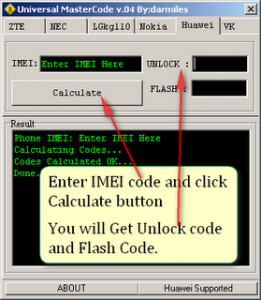
  2. Generate the unlocking code from the modem IMEI Number using Universal Master code calculator which you can download from here if you don't have it
  3. Plug-in your data card with your laptop or desktop (No need to remove sim card from the modem).
  4. Once your data card is detected in your just double click on E173Update_11.126.85.00.114_B427.exefile and it will find the data card and start processing. Universal Master Code Generator Will give you Unlock code and Flash Code
  5. After above screen it will ask you for the unlock code, at this time you need to give FLASH CODE as your password or unlock code and then your data card software upgrade will be done successfully.
  6. Now Download and install Huawei Mobile Partner Software, it will work on Windows XP, Windows Vista and Windows 7 as well.
  7. Now Open the Huawei Mobile Partner from the desktop, and if asked use your unlock code you have generated in the step 2.
  8. Create new profile for you network provider (Using APN and User name and password), try to connect to the internet now.
Hope you are able to unlock your Huawei E173 Modem, Leave a comment.

Saturday, 27 April 2013

LATEST MTN FREE BROWSING

Avail yourself this opportunity and Browse tirelessly with MTN.
Benefits 

  • Unlimited download
  • Unlimited Upload
  • You Browse any day any time for as long as you want
Now Follow this simple steps.


    a. Top up your Airtime with N1000
    b  put your Sim in any Blackberry and Send BBC to 21600
    c. put it back in your modem and set your modem up like this


Call Me Now on +2347034538881  For More Information.


The Screen Shot You Are Seeing is Glo Bolt But Im Using MTN Sim in It cos I Have Unlocked It.

Friday, 26 April 2013

HOW TO RESET YOUR MODEM COUNTER TO ZERO (0)

Requirements

Huwaei Modem Unlocker
Get It From Here

For More Information call +2347034538881

Steps You Have To Follow

  1. First of all collect all requirements given below. Then Open Huawei Modem Unlocker From The Zip File You can See Following Window Then Click On REFRESHreset unlock counter of hhuawei modem
  2. Now Just See Following Screen Shot As Given In Screen Shot Just Select your modems COM PORTreset unlock counter of hhuawei modem 1
  3. Now After Selecting COM PORT Click on READ MDM DATA And Your modem details will be read and after it you can see following window showing modem detailsreset unlock counter of hhuawei modem 2
  4. Now Select RESET COUNTER From huawei Modem Unlocker And Click on SERVICEreset unlock counter of hhuawei modem 3
    1. You Are Done Your Modem Unlock Code Counter Is Now Resetd Have a look on following Screen
      reset unlock counter of hhuawei modem 4
Hope you have rested your unlock code counter so please do share this article to your friend and give us support by commenting and like our facebook page by top left

HOW TO UNLOCK YOUR HUAWEI E303 MODEM UPDATE


Dear Nigerians, I am Pleased to bring to you an update about the E303 Modem. Something Might be difficult but But Impossibility can never be the Answer. Some of you Might have tried in Several ways to unlock their E303 Modem all to no Avail. I personally Have Unlocked Some but the Truth is this, NOT ALL THE E303 MODEMS ARE THE SAME and so Does not Follow the Same Procedure to Unlock.
Now Kindly follow this Simple Step Which I believe it will work out for you. For Any Information you can Place me a call on +2347034538881 and I will Guide you.


1. Download Universal Master Code Calculator so that we get the FLASH CODE

2. After downloading it Put the IMEI and get the FLASH code that we are going to use them as a PASSWORD.

3. Download HUAWEI E303 firmware update here

4. Unzip the file and make sure the modem is connected and it has been installed with the SIM card inside it.

5. Quit the dashboard if its open and run the update, wait and when it ask you for the PASSWORD input the FLASH CODE you got from Universal Mastercode Calculator.. Wait for about 3 min and your modem will be unlocked PERMANENTLY.


ENJOY. LIKE OUR FACEBOOK PAGE @ YOUR TOP LEFT FOR UPDATES ON FREE BROWSING, UNLOCKING CODES OF ANY KIND. MOBILE SOLUTION IS THE ANSWER.
FOR ONE ON ONE CHAT, CALL +2347034538881

THIS POST HAVE BEEN UPDATED, CLICK HERE TO VIEW THE UPDATE ON HOW TO UNLOCK YOUR E303 MODEM

I HOPE THIS HAVE BEEN VERY INFORMATIVE,

Get the Full Material delivered to your Email, . Call us on 07034538881

Follow Us On Twitter,
Like Us On Facebook,
Join Our Cycle On Google+

we can keep u updated by subscribing for free using your email
For more clarification, Please Leave a comment.

Related Posts Plugin for WordPress, Blogger...