
- Open Outlook 2010. If the Microsoft Outlook 2010 Startup wizard displays automatically, on the first page of the wizard, click Next. Then, on the E-mail Accounts page of the wizard, click Next again to set up an e-mail account.
If the Microsoft Outlook 2010 Startup wizard doesn't appear, on the Outlook 2010 toolbar, click the File tab. Then, just above the Account Settings button, click Add Account.
- On the Auto Account Setup page, Outlook may try to automatically fill in the Your Name and E-mail Address settings based on how you're logged on to your computer. If the settings are filled in and they're correct, click Next to have Outlook finish setting up your account.
If the settings on the Auto Account Setup page aren't filled in or aren't correct, consider the following as you correct the settings:
- If the settings on the Auto Account Setup page aren't filled in for you, type the correct settings based on the information that was provided to you by the person who manages your e-mail account.
- If the name in the Your Name box isn't correct, you may need to reset the options on the Auto Account Setup page before you can edit your name. To reset the options, click the option button next to Manually configure server settings or additional server types, and then click the option button next to E-Mail Account.
- If the settings on the Auto Account Setup page aren't filled in for you, type the correct settings based on the information that was provided to you by the person who manages your e-mail account.
- After you click Next on the Auto Account Setup page of the wizard, Outlook will perform an online search to find your e-mail server settings. You'll be prompted to enter your user name and password during this search. Make sure that you enter your full e-mail address (for example, tony@contoso.com) as your user name.
If Outlook is able to set up your account, you'll see the following text: Your e-mail account is successfully configured. Click Finish.

Tuesday, 27 May 2014
How to Set Up E-Mail in Outlook 2010 or Outlook 2013

HOW TO KNOW THE SENDER'S LOCATION OF THE EMAILS YOU GET
Have you ever received an unknown email and you are wondering who the sender could be. If your anwser is no then you might not know what i'm talking about. If you have ever received one of these threatening messages, please don't panic any more, there is a way out now.
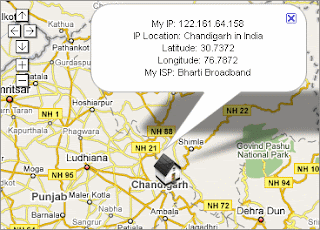
How to Find Sender's IP address in Hotmail
1. Log into your Hotmail account with your username and password.
2. Click on the Mail tab on the top.
3. Open the mail.
4. If you do not see the headers above the mail message, your headers are not displayed. To display the headers,
* Click on Options on the top-right corner
* In the Mail Options page, click on Mail Display Settings
* In Message Headers, make sure Advanced option is checked
* Click on Ok button
* Go back to the mails and open that mail.
5. If you find a header with X-Originating-IP: followed by an IP address, that's the sender's IP address Hotmail headers : name ,In this case the IP address of the sender is [68.34.60.59]. Jump to step 9. 6. If you find a header with Received: from followed by a Gmail proxy like thisHotmail headers : nameLook for Received: from followed by IP address within square brackets[].In this case, the IP address of the sender is [69.140.7.58]. Jump to step 9. 7. Or else if you have headers like thisHotmail headers : nameLook for Received: from followed by IP address within square brackets[].In this case, the IP address of the sender is [61.83.145.129] (Spam mail). Jump to step 9. 8. * If you have multiple Received: from headers, eliminate the ones that have proxy.anyknownserver.com.9. Track the IP address of the sender
How to find the IP address of the sender in Gmail: When you receive an email, you receive more than just the message. The email comes with headers that carry important information that can tell where the email was sent from and possibly who sent it. For that, you would need to find the IP address of the sender. The tutorial below can help you find the IP address of the sender. Note that this will not work if the sender uses anonymous proxy servers.
Finding IP address in Gmail:
1.Log into your Gmail account with your email address and password.
2. Go to your inbox and open a mail.
3. To show the email headers, Click on More options on that mail thread. You should get a massive bunch of links displayed. Click on Show original.

4. Next you would get headers like this:Gmail headers : nameLook for Received: from followed by a few hostnames and an IP address between square brackets. In this case, it is65.119.112.245.That should be the IP address of the sender!
5. Track the IP address of the sender. by going to site like whatismyipaddress.com
How to Find Sender's IP address in Hotmail
1. Log into your Hotmail account with your username and password.
2. Click on the Mail tab on the top.
3. Open the mail.
4. If you do not see the headers above the mail message, your headers are not displayed. To display the headers,
* Click on Options on the top-right corner
* In the Mail Options page, click on Mail Display Settings
* In Message Headers, make sure Advanced option is checked
* Click on Ok button
* Go back to the mails and open that mail.
5. If you find a header with X-Originating-IP: followed by an IP address, that's the sender's IP address Hotmail headers : name ,In this case the IP address of the sender is [68.34.60.59]. Jump to step 9. 6. If you find a header with Received: from followed by a Gmail proxy like thisHotmail headers : nameLook for Received: from followed by IP address within square brackets[].In this case, the IP address of the sender is [69.140.7.58]. Jump to step 9. 7. Or else if you have headers like thisHotmail headers : nameLook for Received: from followed by IP address within square brackets[].In this case, the IP address of the sender is [61.83.145.129] (Spam mail). Jump to step 9. 8. * If you have multiple Received: from headers, eliminate the ones that have proxy.anyknownserver.com.9. Track the IP address of the sender
HOW TO FIND THE SENDERS THROUGH IP ADDRESS IN MESSAGE HEADER IN GMAIL
How to find the IP address of the sender in Gmail: When you receive an email, you receive more than just the message. The email comes with headers that carry important information that can tell where the email was sent from and possibly who sent it. For that, you would need to find the IP address of the sender. The tutorial below can help you find the IP address of the sender. Note that this will not work if the sender uses anonymous proxy servers.
Finding IP address in Gmail:
1.Log into your Gmail account with your email address and password.
2. Go to your inbox and open a mail.
3. To show the email headers, Click on More options on that mail thread. You should get a massive bunch of links displayed. Click on Show original.

4. Next you would get headers like this:Gmail headers : nameLook for Received: from followed by a few hostnames and an IP address between square brackets. In this case, it is65.119.112.245.That should be the IP address of the sender!
5. Track the IP address of the sender. by going to site like whatismyipaddress.com
AIRTEL FACEBOOK BUNDLE ACTIVATION CODE
Guess what with Airtel? they now offer a facebook bundle. I know you may wonder what that means. Well i think it is something you should also know about. There's no point saying much. Airtel Facebook bundle is a new service by Airtel that allows subscriber gain access to Only facebook for a ridiculous N500/month. You can also pay N50 and Facebook is yours for the whole day!

This Plan is available to users of all smartphone devices and PDA. it is also available to all those with internet enabled mobile phones. All prepaid and postpaid customers on Airtel are eligible to subscribe to this plan and it doesn't require any special SIM.
I think it makes sense trying it out. This service is for sure a better choice if you happen to be a Facebook Addict Like myself. You can see the table below for yourself but before that, I think it also Important to let you know that all other Internet activities will be charged dearly.
For example, send dfb to 688, for daily facebook data plan, wfb and mfb to 688 for the Weekly & Monthly respectively.
To subscribe via USSD punch 688*(ACtivation Code)# SEND. you can take a look at the Table above to Know which Activation code to go for.
Send status to 688, and you will be replied with the message:
Dear Customer, you are on the FaceBook (Daily, Weekly or Monthly) Bundle, you have used up xMB so far and your validity expires on dd-mm-yy
This Plan is available to users of all smartphone devices and PDA. it is also available to all those with internet enabled mobile phones. All prepaid and postpaid customers on Airtel are eligible to subscribe to this plan and it doesn't require any special SIM.
I think it makes sense trying it out. This service is for sure a better choice if you happen to be a Facebook Addict Like myself. You can see the table below for yourself but before that, I think it also Important to let you know that all other Internet activities will be charged dearly.
| Plan | Retail Price (N) | Dial USSD Activation Code | SMS Activation Code to 688 |
| Daily FaceBook Bundle | 50 | *688*1# | dfb |
| Weekly FaceBook Bundle | 200 | *688*2# | wfb |
| Monthly FaceBook Bundle | 500 | *688*3# | mfb |
| Status Check | *688*0# | status | |
| Help Message | help |
How TO Subscribe To Airtel Facebook Bundle Via SMS and USSD
text the right keyword to 688 to subscribe.For example, send dfb to 688, for daily facebook data plan, wfb and mfb to 688 for the Weekly & Monthly respectively.
To subscribe via USSD punch 688*(ACtivation Code)# SEND. you can take a look at the Table above to Know which Activation code to go for.
How To Check Your Balance or Data Status
Send status to 688, and you will be replied with the message:
Dear Customer, you are on the FaceBook (Daily, Weekly or Monthly) Bundle, you have used up xMB so far and your validity expires on dd-mm-yy
HOW TO CHECK DATA BALANCE ON AIRTEL
There have been some renovations recently on Airtel networking. Due to this so many of the codes one normally use for the data subscription have been affected. Some have been changed intoto, while some have been re-assigned to other service. Just yesterday i got a call from my friend telling me that he subscribed for 1500 subscription plan and what he could see is 90MB instead of 2G.
 There have not removed the plan neither have they stopped it from running on Android devices. Bellow are the new codes and the plan for it.
Checking of Payed MB balance: *123*9# bbm
Checking of Bonus MB Balance: *123*10#
I HOPE THIS HAVE BEEN VERY INFORMATIVE.Follow Us On Twitter,
Like Us On Facebook,
Join Our Cycle On Google+
CONTACT US TODAY FOR OUR SERVICES
we can keep u updated by subscribing for free using your email
A Must Read: Learn How to Start recharge card printing business today and make N10,000 weekly
Checking of Payed MB balance: *123*9# bbm
Checking of Bonus MB Balance: *123*10#
I HOPE THIS HAVE BEEN VERY INFORMATIVE.Follow Us On Twitter,
Like Us On Facebook,
Join Our Cycle On Google+
CONTACT US TODAY FOR OUR SERVICES
we can keep u updated by subscribing for free using your email
A Must Read: Learn How to Start recharge card printing business today and make N10,000 weekly
MTN partners Lumos to lighten up Nigeria
Necessityis the mother of invention”, so the saying goes. The expediency and truism in this age-long witty saying came into full meaning a fortnight ago when MTN Nigeria in collaboration with Nova Lumos, GSMA and Schneider Electric addressed a press conference on the MTN Mobile Electricity, an affordable solar electricity solution that can power light bulbs, cellphones, fans, PCs or laptops, radios and other small electronic devices, all at once, every day.
Over the last three decades, the perennial energy crisis confronting Nigeria has become a source of worry to the country’s leadership, regime after regime. At a little over 4,000 megawatts at the best of times and about 3,600 (as in the last six months), power generation, distribution and transmission keep ebbing. Not even the recent unbundling of the PHCN into GENCOs, DISCOs and TRANSCOs has any inkling of hope for the desired succor. At a dismal 4,000 megawatts for 160 million people, Nigeria may as well still be in the dark ages when compared to South Africa’s 45,000 megawatts for 52.98million people.
It is no longer news that a few years back, some multinationals closed their shops, pulled out of Nigeria, and took their businesses to other countries in the sub-region with more reliable power supply. This was necessitated largely because of the high energy cost which made their goods and services expensive, therefore, uncompetitive.
On the domestic front, shortage of light, in some cases non-existent, has affected the quality of life. The attendant consequence of lack of power can be felt all around us: a largely irritant and discomfited population for whom most of the electrical appliances in their homes have become part of the house furniture.
According to Mr. Marcel Hochet, Country President, Schneider Electric, of the over 1.3 billion people in the world who live without electricity, 600 million live in Sub-Saharan Africa and of Nigeria’s 160 million population, about half are not connected to the national grid. These statistics are mind boggling!
Enter Nova Lumos. For as little as N200.00 per week, households particularly in rural Nigeria can enjoy continuous 24/7 electricity to power basic domestic appliances. It is the near-perfect solution to replace candles and flashlight in homes across the country.
On the rationale for preferring MTN as a partner on the project, Davidi Vortman, CEO, Nova Lomus was quick to point to MTN’s innovative and continental leadership role in the ICT sector.
Lumos is technologically and financially backed by Schneider, a world leader in energy technology as well as the GSM association (GSMA) a global trade union for mobile operators. The management infrastructure for the service will ride on MTN’s telecoms network to reach its subscriber base which is in excess of 55 million in Nigeria.
At the official unveiling and memorandum signing ceremony of the partnership, Mary Roach, the GSMA Programme Operations Manager, said: “Nova Lumos in partnership with MTN Nigeria received funding from the GSMA’s Mobile Enabled Community Services (MECS) Innovation Grant Fund with the support of the UK Government.”
This grant, she said, is awarded to organisations developing innovations that improve access to energy and water among undeserved communities by leveraging mobile technology and infrastructure. The MECS Innovation Fund has helped to highlight the demand for mobile-enabled services and the role that mobile can play in supporting access to basic utility services across rural and urban markets.
For MTN and its partners, beyond business, this is a creative yet altruistic step in bridging the gap as government continues to look at ways of finding a lasting solution to the power crisis. The result of this synergy is a “win-win” for all parties concerned including the end users. In terms of value and in deference to preserving the environment, the mobile electricity solution (MES) is both sustainable and renewable. In addition, unlike other alternative energy platforms that still require connection to other forms of energy for charging, the MES is maintenance-free because it is a service not a product.
The benefits of the service include easy installation and competitive pricing-cost of acquisition is between N5,000 and N10,000 and the fact that it uses the ubiquitous GSM technology to recharge. At the end of the day, the MTN–Lumos synergy will bring a little succor to Nigerians.
In the words of Henry Okoede, MTN’s Senior Manager, Business Development, this new partnership is in furtherance of MTN’s bold new digital world vision which finds full expression in using mobile telephony and technology in impacting lives positively, while reducing exclusion and social disparity. Just like Nigeria has been able to find a solution to its communication problem, with a bit of creativity and difference in approach, it should be able to solve the energy problem although this may take a whil
Over the last three decades, the perennial energy crisis confronting Nigeria has become a source of worry to the country’s leadership, regime after regime. At a little over 4,000 megawatts at the best of times and about 3,600 (as in the last six months), power generation, distribution and transmission keep ebbing. Not even the recent unbundling of the PHCN into GENCOs, DISCOs and TRANSCOs has any inkling of hope for the desired succor. At a dismal 4,000 megawatts for 160 million people, Nigeria may as well still be in the dark ages when compared to South Africa’s 45,000 megawatts for 52.98million people.
It is no longer news that a few years back, some multinationals closed their shops, pulled out of Nigeria, and took their businesses to other countries in the sub-region with more reliable power supply. This was necessitated largely because of the high energy cost which made their goods and services expensive, therefore, uncompetitive.
On the domestic front, shortage of light, in some cases non-existent, has affected the quality of life. The attendant consequence of lack of power can be felt all around us: a largely irritant and discomfited population for whom most of the electrical appliances in their homes have become part of the house furniture.
According to Mr. Marcel Hochet, Country President, Schneider Electric, of the over 1.3 billion people in the world who live without electricity, 600 million live in Sub-Saharan Africa and of Nigeria’s 160 million population, about half are not connected to the national grid. These statistics are mind boggling!
Enter Nova Lumos. For as little as N200.00 per week, households particularly in rural Nigeria can enjoy continuous 24/7 electricity to power basic domestic appliances. It is the near-perfect solution to replace candles and flashlight in homes across the country.
On the rationale for preferring MTN as a partner on the project, Davidi Vortman, CEO, Nova Lomus was quick to point to MTN’s innovative and continental leadership role in the ICT sector.
Lumos is technologically and financially backed by Schneider, a world leader in energy technology as well as the GSM association (GSMA) a global trade union for mobile operators. The management infrastructure for the service will ride on MTN’s telecoms network to reach its subscriber base which is in excess of 55 million in Nigeria.
At the official unveiling and memorandum signing ceremony of the partnership, Mary Roach, the GSMA Programme Operations Manager, said: “Nova Lumos in partnership with MTN Nigeria received funding from the GSMA’s Mobile Enabled Community Services (MECS) Innovation Grant Fund with the support of the UK Government.”
This grant, she said, is awarded to organisations developing innovations that improve access to energy and water among undeserved communities by leveraging mobile technology and infrastructure. The MECS Innovation Fund has helped to highlight the demand for mobile-enabled services and the role that mobile can play in supporting access to basic utility services across rural and urban markets.
For MTN and its partners, beyond business, this is a creative yet altruistic step in bridging the gap as government continues to look at ways of finding a lasting solution to the power crisis. The result of this synergy is a “win-win” for all parties concerned including the end users. In terms of value and in deference to preserving the environment, the mobile electricity solution (MES) is both sustainable and renewable. In addition, unlike other alternative energy platforms that still require connection to other forms of energy for charging, the MES is maintenance-free because it is a service not a product.
The benefits of the service include easy installation and competitive pricing-cost of acquisition is between N5,000 and N10,000 and the fact that it uses the ubiquitous GSM technology to recharge. At the end of the day, the MTN–Lumos synergy will bring a little succor to Nigerians.
In the words of Henry Okoede, MTN’s Senior Manager, Business Development, this new partnership is in furtherance of MTN’s bold new digital world vision which finds full expression in using mobile telephony and technology in impacting lives positively, while reducing exclusion and social disparity. Just like Nigeria has been able to find a solution to its communication problem, with a bit of creativity and difference in approach, it should be able to solve the energy problem although this may take a whil
Sunday, 25 May 2014
THEORETICAL PERSPECTIVE ON HUMAN CAPITAL DEVELOPMENT AND SOCIO-ECONOMIC DEVELOPMENT
In the traditional neo-classical growth model, developed by Robert Solow and Trevor Swan in the 1950s, the output of an economy grows in response to larger inputs of capital and labor (all physical inputs). To the neo-classical growth models, non-economic variables, such as human health, skills, knowledge, etc., have no function in the growth process of an economy. This line of thought was described as the Exogenous growth theory and it does not explain why countries with little capital and labor grow more than countries with abundance of these resources.
A new theory described as the endogenous growth theory emerged in the 1980s, particularly due to the works of Paul Romer and his associates in response to the postulations of the exogenous theorists. They argued that economic growth and development in most fast developing economies, particularly, those of the East Asian developing countries, where the economies have continued to grow for well over three decades, demonstrated quite the contrary. The argument is that, it is not only technology, which is the main driving force accountable for maintaining such high growth performance in the economies, but that there were other factors which are outside the realm of the neoclassical growth model.
A new theory described as the endogenous growth theory emerged in the 1980s, particularly due to the works of Paul Romer and his associates in response to the postulations of the exogenous theorists. They argued that economic growth and development in most fast developing economies, particularly, those of the East Asian developing countries, where the economies have continued to grow for well over three decades, demonstrated quite the contrary. The argument is that, it is not only technology, which is the main driving force accountable for maintaining such high growth performance in the economies, but that there were other factors which are outside the realm of the neoclassical growth model.
Features of Android 4.5 Lollipop

Google may reveal Android 5 Lollipop in the I/O technology conference on 25 June, and its expected features may be a major update from KitKat. Smart phones right now run on Google’s Android KitKat 4.4, the latest update in the line of candy-themed mobile operating systems. Every year in June the Google developers’ conference releases updates to its products and this year is no different. It is expected that updated features to Google Glass, the smart watch line and the range of Nexus smart phones will include Android 5 Lollipop.
After collaborating with Nestle to release Android 4.4 KitKat in September 2014 last year, minor updates were released to correct bugs and fix issues with the operating system and apps. Rumored to be revising the approach it takes to web apps, images have been leaked showing how what Lollipop looks like. Project Hera, Google’s effort to unify the Chrome browser with Android and Search is also set to debut in June. The project is designed to revamp the experience for Android users who run Google’s Search and Chrome apps on their Android phones, and a major user-interface revamp is also expected. HTML 5 integration is expected to a level where one can experience functional multi-tasking windows. Taking the design concept from Ubuntu’s Edge, Google wants to ease the transition from the mobile phone to the desktop for most users, meaning it would be possible to send an email while listening to music without having to enter the app itself. Android 4.5 can see one starting a task on the computer, leaving it as a Google task card on your phone to finish it later. Android 4.5 also plans on making OK Google, its voice search assistant, as competent as Siri, calling it Ok Google Everywhere, but integrating it deeply into the OS itself.
It is expected that Android 4.5 Lollipop will offer support for the processor and graphics chipset. Support for 64 bit-processors makes running Android smooth on devices with 2 to 4GB RAM. Android 4.4 KitKat currently runs on 512 MB RAM and Google plans to add a few additional features to make 4.5 better. With cross compatibility in case of mobile networks, improvements in camera features, and better audio and video experience, Google’s Lollipop is aiming to be better than KitKat. The gaming community will experience smoother multi-tasking, while an improved battery life increases performance, allowing users to support and write data on micro SD cards.
As Apple gears to launch the iWatch, Google has plans to integrate Lollipop with its wearable range of smart wear . Google Glass and the smart watch range are expected to run on Android 4.5, but reports suggest that there may be a new wearable application that monitors devices that are connected to the smart phone. With Lollipop, these features will work better without draining the battery and data.
Security also seems to be an area of focus for Android. It is currently being targeted by mobile malware, making security its biggest concern. Apps from the PlayStore usually are loaded with bloatware, making users vary of the store itself. Preferring to use the .apk (installable) files instead of downloading the apps, Google is losing customers who download apps from the PlayStore. Android 4.5 Lollipop aims to fix this issue by setting up a rigid app selection system. Handling data with fingerprint sensors and face unlock will make Lollipop better than KitKat. More features are expected to be included in Android 5.5 Lollipop, but users will have to wait for June to hear more of it.
By Rathan Paul Harshavardan.
Sources:
The Fuse Jopiln
Stuff.tv
TechRadar.com
Subscribe to:
Posts (Atom)
