Showing posts with label EMAIL SETUP.. Show all posts

Friday, 27 May 2016

How to Enjoy Technological Gadgets

safe_image-47 
Technology evolves everyday and unless you are a geek or technophile, it can be rather challenging to keep up with the new innovations constantly making entry into the
market.

Nevertheless, even with tech addiction, you can still be shrewd or frugal at the same time. To make this feasible,we shares some ideas which will tremendously help you enjoy technology without breaking the bank!

Avoid early adoption

When a device is newly introduced into the market, there is a very high possibility that the price or cost will be very high. You will be spending so much money on the device if you are an early adopter. If you are so keen on buying the device, you can leave a months or two intervals so that the price for the product can crash. You will save a significant amount if you are able to pull this off.

Stop impulse buying

The popularity of e-commerce business in Nigeria and other parts of the world has largely encourages impulse buying. Immediately a product is released, you can buy it immediately online hours after the release or you see a nice tech gadget, you purchase it. In order to save money, stay away from impulse buying.
safe_image-47

Buy durable and long lasting device

Many rate price over quality. This is why they prefer to buy cheap devices with little or no quality. As a result of the low quality, they repeatedly buy the same product because it is not durable. Why not simply gather enough money and buy quality, durable and long-lasting devices?

Buy Fairly used devices  

Some may probably not like this because they have a knack to brand new devices. You should ask yourself whether you can afford the brand new device or not? There is nothing wrong with fairly used. The important thing is that you should not buy on the streets. Afterwards, it behooves on you to ensure that the device is in proper condition.   
love-technology

Fix It Yourself  

It is not compulsory for you to become an overnight technician because you want to repair your device. However, there is nothing wrong with making an attempt to repair your damaged phone. Essentially, if you know that you cannot repair it yourself, you should send to your friends for repair. Do just walk anywhere and deliver your phone to anyone. You may even be lucky, the phone may still on warranty.  

Take advantage of discounts, deals, and coupons

Online stores offer discounts on various devices available on their platforms. So, rather than buying at a physical store, you can buy online where you can get mouthwatering deals, discounts, and coupons.

Don't Be stingy, Share this with your friends

Quick ways to transfer files between your PC and smartphone

data-sharingIn time past, transferring files like videos, photos and music could take forever. However, with the advancement in technology, you can move large files within minutes without worrying about how
long it with take. For the technology 'novice' as well as the tech geek, we bring to you the fastest and quickest ways to exchanges files between your personal and your smartphone.

Bluetooth

This is the most used way to transfer file between devices including your PC and your phone. It is very simple to use. The user simply turn-on the Bluetooth of both devices, pair them and then select the documents, music, picture or video you want to send.  You can send as many files you want  at the same time. Also, ensure that you turn on the visibility of your Bluetooth to make it discoverable.

Card readers  

When you buy a memory card (8GB, 16GB, 32 GB and 64GB), it is usually accompanied by a card reader. It is in this card reader that you insert your SD card which enables you to move files between your PC and your phone. You save the files you want to transfer in your memory card with your phone. Afterwards, insert the memory card in your card reader, and insert into the memory card space of your PC. Open the card reader on your PC and cut or copy your desired files from the memory card.

WiFi

It is also possible for you to transfer files through your wireless network also known as Wi-Fi. You can do this if your computer is connected to a network. In addition to this, you must  download WiFi app ShareIt which you can get on Google Play Store. The app makes it easy to setup a wireless network.
NFC-Smartphones

NFC connection

Near Field Communication (NFC) is fast catching up with Bluetooth as many smartphones now come with this technology. NFC may not be as fast as Bluetooth but it is very reliable as it provides secure data transfer. To make the transfer possible, both devices have to be touch with  each other.

USB cable

This is even easier to use than Bluetooth. You connect a compatible USB cable with your phone and computer. Allow your computer some few minutes to recognize the cable. When this is  done, you can choose and move any file  you want to transfer 

Top 4 Social media scams to avoid

social_media_fraud_rick_ellis_aismedia
Top 4 Social media scams to avoid
Social media rules the world. It is the new tech addiction that many young people cannot do without as they spend hours viewing, reading and posting content via the internet. This underscores the importance of social media in today's world. As the use of social media rises, there are others out there who are using it to swindle and scam unsuspecting users.

Fake customer service account

Brands and corporate organizations are now on social media as such, it has become possible to resolve complaints and get a quick response to questions on social media. Some of these accounts representing corporate institutions are verified while others are not. Hence, the possibility of chatting with a parody customer service handle is high. If you are getting an unsatisfactory response, you should  contact their official helpline.

Comments on popular posts or articles

A particular post or article may generate sizeable comments. And among the comments, you will notice some links directing you to other websites. These links lure you to websites that are either unsafe or offering scandalous services so it is better to ignore such links.
scam

False online discounts

The false discounts are too fantastic to be true. It is not surprising because it is coming from a parody customer service account. They are not legitimate and you can lose your personal information if you fall for it because you will be asked to fill out forms that require your personal information.

Online surveys and polls

The rule of thumb is ‘if you do not trust the website, do not visit it’. One of the easiest ways to have your  personal information stolen is via online survey and polls. Most fraudulent hackers often tweet or post a dangerous link urging users to complete forms for a survey. You can fill the forms but do not give out information like credit card details.

Avoid live streaming videos

This is another way of scamming people on social media as more media companies start streaming their shows and movies online. But these links they share on social media lead to fake websites which only ask for data of visitors.

Thursday, 25 February 2016

Another Means For PC Users To Enjoy MTN Unlimited Surfing With N0.0kobo

OpenVPN is still working very well for MTN Unlimited Surfing With N0.0kobo, but here is another alternative for the PC users to enjoy this tweak to the fullest.


For The PC Users To Browse With MTN Unlimited Free Surfing Via SimpleServer

» Download and extract this customized SS-for-Mtn-N0.0kobo Surfing to a new folder on your desktop background.


Connect Your Modem With:
» APN: web.gprs.mtnnigeria.net.
» Proxy: leave it empty
» Port: leave it empty

» Open the file you extracted, double-click "SimpleServer.exe"and make sure is always on open.
Open the file you extracted, double-click "SimpleServer.exe"and make sure is always on open. - See more Here
» Configure your Browsers and IDM to 127.0.0.1 Port 8080
» Remember to tick: "Use this proxy server for all protocols" if you want it to open all secured sites.

Keep flexing with MTN without paying dine.

Mother And 4 Children Killed In Kebbi - Very Graphic Photos

This world has come to an end. On the 22nd Night of this Month, people of Birnin kebbi woke up with terrible tragedy in which five people were brutally massacred
. All of them were females. Which include: the mother, her two twin daughters and two other girls of ages 17 and 5 from their neighboring house who came to stay with them. All of them were massacred only the four month old baby that was at the back of her mother was left.

In Summary

A mother, 35 and four children were murdered in their home in Bayan Kara Area of Birnin Kebbi, three female and a male, including 3 years old twins and leaving behind a baby of less than three months old.

The incidence was suspected to have occurred in the night of Sunday, but observed on Monday morning.

Gov. Abubakar Atiku Bagudu of Kebbi State personally visited the site of the incident. He expressed his disgust and agony over the heinous tragedy, which he described as a tragic incidence.

While praying for Allah to forgive the victims, he thanked the team of security experts for their swift response and also directed them not to relent until they get the perpetrators of the crime

Tuesday, 19 August 2014

DEFAULT CONFIGURATION SETTING FOR MTN, ETISALAT, GLO AND AIRTEL NETWORKS

THE LATEST CONFIGURATION FOR MTN, GLO, ETISALAT,AIRTEL FREE BROWSING CHEATS, FREE BROWSING TRICKS & CODES, GLO,ETISALAT, AIRTEL, MTN FREE BROWSING TWEAKS, IP CHEATS, FREE SERVER SETTINGS, FREE IPs AND PORTS, FREE WAP, APN, 3.5G MODEMS, FREE BROWSING TRICKS, INTERNET FREE GATEWAYS, WIRELESS HOTSPOTS


MTN CONFIGURATION

Account Name: MTN WAP

Homepage: http://wap.mtnonline.com
Username: web
Password: web
Access Point Name (APN) : web.gprs.mtnnigeria.net
IP or Proxy Address: 010.199.212.002
Port: 8080


ETISALAT DEFAULT CONFIGURATION

Account Name: ETISALAT
Homepage: http://www.etisalat.com.ng/
OR
http://mobile.etisalat.com.ng/
Username: wap
Password: wap
Access Point or APN: etisalat
IP or Proxy Address: 010.071.170.005
Port: 8080


GLO DEFAULT CONFIGURATION

Account Name: GLO
Homepage: http://wap.gloworld.com
Username: wap
Password: wap
Access Point Name (APN) : glosecure
IP or Proxy Address: 010.100.098.022
Port: 8080


Friday, 18 July 2014

HOW TO USE GLO BORROW ME CREDIT

Glo has launched path breaking product called Borrow Me Credit for Prepaid Customers.  This is the most innovative service launched by Glo. Currently, when customer runs out of recharge, he has to go to out to buy a recharge card and top up his account. Sometimes there are situations when customer cannot go out to buy recharge card; during late night hours, while travelling, etc. Under these emergency situations customer is not able to make call due to low balance and there is opportunity loss for Glo.

Now, we offer solution to such customers who have consumed their airtime and cannot go out immediately to buy recharge card. Customer can send request to avail the facility of airtime credit by sending text on the short code. Customer will repay his credit by recharging his account and credit airtime will be deducted from his balance.

The customer is required to request through the predefined short code *321#, which will provide the customer the amounts qualified for. To get specific denominations use the following short codes:

    *321*50# for N50,
    *321*100# for N100,
    *321*200# for N200,
    *321*500# for N500
    *321*1000# for N1000

The Emergency Airtime Service allows active Globacom prepaid customers who meet the eligibility criteria set out in the table below.

Eligibility Matrix

Denomination (N)Time on Network (Months)Average Monthly RefillsAverage Monthly Usage (N)
5040200
10040400
20040800
500402000
10001205000

The airtime advanced is subject to a service charge as mentioned below


Service Charges

Denomination (N)Time on Network (Months)Average Monthly Refills
50545
1001090
20020180
50050450
1000100900

Sunday, 8 June 2014

Airtel seals partnership deal with Apple on iPhone 5s

One of the leading telecommunications services providers in Nigeria, Airtel Nigeria, has sealed a strategic partnership with leading mobile phone maker, Apple, to officially unveil the iPhone 5s in Nigeria.

With this development, Airtel becomes the first mobile telecommunications services provider in Nigeria to officially seal a partnership deal with Apple.

The partnership is expected to offer telecoms consumers across the country an opportunity to purchase the iPhones in Airtel showrooms nationwide or from the outlets of its channel/retail partners including Slot.

Speaking during an event to unveil the iPhone 5s in Lagos, the Chief Executive Officer and Managing Director, Airtel Nigeria, Segun Ogunsanya, described the company’s partnership with Apple as the coming together of two great brands, saying the partnership is a demonstration of Apple’s trust in Airtel and indeed in Nigeria.

He added that the partnership underscores Airtel’s unwavering commitment to its vision of becoming Nigeria’s number 1 mobile Internet service provider.

“At Airtel Nigeria, we believe that the future of mobile telephony is mobile Internet and so we are repositioning to revolutionize this landscape with innovative value offerings and strategic partnerships.

“Our partnership with Apple is a glowing testimony to our desire to lead with Internet. Our enviable track record also provides us a leverage to empower more Nigerians to enjoy super-fast Internet services on their devices and mobile phones on the Airtel network,” he said.

He noted that Airtel is currently embarking on a wide-scale expansion, modernization and transformation of its network.

“Our goal is to ensure that telecoms consumers enjoy the best experience on VOICE, VISUAL and VIDEO as they engage and connect with friends and family members as well as transact their businesses on the Airtel network,” he said.

The iPhone 5s is described by telecoms pundits as the most forward-thinking smartphone in the world. iPhone 5s sets a precedent, with an amazing amount of technology in a remarkably thin, light design.

It builds on that achievement with Touch ID — a fingerprint identity sensor. An A7 chip with 64-bit architecture. An even more impressive iSight camera. And ultrafast LTE wireless.

Tuesday, 27 May 2014

HOW TO KNOW THE SENDER'S LOCATION OF THE EMAILS YOU GET

Have you ever received an unknown email and you are wondering who the sender could be. If your anwser is no then you might not know what i'm talking about. If you have ever received one of these threatening messages, please don't panic any more, there is a way out now.


How to Find Sender's IP address in Hotmail
1. Log into your Hotmail account with your username and password.
2. Click on the Mail tab on the top.
3. Open the mail.

4. If you do not see the headers above the mail message, your headers are not displayed. To display the headers,
* Click on Options on the top-right corner
* In the Mail Options page, click on Mail Display Settings
* In Message Headers, make sure Advanced option is checked
* Click on Ok button
* Go back to the mails and open that mail.


5. If you find a header with X-Originating-IP: followed by an IP address, that's the sender's IP address Hotmail headers : name ,In this case the IP address of the sender is [68.34.60.59]. Jump to step 9. 6. If you find a header with Received: from followed by a Gmail proxy like thisHotmail headers : nameLook for Received: from followed by IP address within square brackets[].In this case, the IP address of the sender is [69.140.7.58]. Jump to step 9. 7. Or else if you have headers like thisHotmail headers : nameLook for Received: from followed by IP address within square brackets[].In this case, the IP address of the sender is [61.83.145.129] (Spam mail). Jump to step 9. 8. * If you have multiple Received: from headers, eliminate the ones that have proxy.anyknownserver.com.9. Track the IP address of the sender

HOW TO FIND THE SENDERS THROUGH IP ADDRESS IN MESSAGE HEADER IN GMAIL


How to find the IP address of the sender in Gmail: When you receive an email, you receive more than just the message. The email comes with headers that carry important information that can tell where the email was sent from and possibly who sent it. For that, you would need to find the IP address of the sender. The tutorial below can help you find the IP address of the sender. Note that this will not work if the sender uses anonymous proxy servers.

Finding IP address in Gmail:
1.Log into your Gmail account with your email address and password.
2. Go to your inbox and open a mail.
3. To show the email headers, Click on More options on that mail thread. You should get a massive bunch of links displayed. Click on Show original.

4. Next you would get headers like this:Gmail headers : nameLook for Received: from followed by a few hostnames and an IP address between square brackets. In this case, it is65.119.112.245.That should be the IP address of the sender!
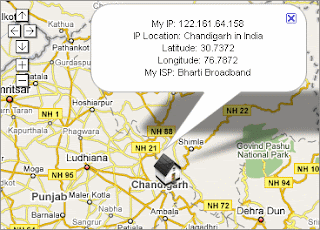
5. Track the IP address of the sender. by going to site like whatismyipaddress.com

I HOPE THIS HAVE BEEN VERY INFORMATIVE,

Get the Full Material delivered to your Email, . Call us on 07034538881

Follow Us On Twitter,
Like Us On Facebook,
Join Our Cycle On Google+

we can keep u updated by subscribing for free using your email
For more clarification, Please Leave a comment.

Related Posts Plugin for WordPress, Blogger...