Showing posts with label ETISALAT FREE BROWSING. Show all posts

Friday, 24 June 2016

5 Bluetooth Myths you Should Drop

lumia-bluetooth
You can barely find something that doesn’t have a myth, history or legend associated with it. However, the question many often ask is whether the myths they hear are true or false.
Since Bluetooth became popular, there have been so many beliefs that people have held on to about this amazing technology. And this is the time to drop some of these beliefs or myths.
Non-discoverable Bluetooth is secured
Your Bluetooth is not secured even if it cannot be found by other devices so the best option is to switch off your Bluetooth when it’s not in use. If your Bluetooth is on, your phone can be hacked because your Bluetooth Device Address (BDA) might be hidden in non-discoverable mode and hackers can take advantage of this loophole.
Enabling Bluetooth kills your battery
Many people believe that immediately they switch on their phone’s Bluetooth, they begin to lose battery. This actually false. Even if the Bluetooth icon stays on for hours, it has no impact on the battery. This is because many smartphones now come with Low Energy Module which allows you to use your Bluetooth without your phone shedding any battery.
Bluetooth is not good for your health
Health experts are yet to agree on whether the radiation from your smartphone is harmful or not. This is same with Bluetooth which is one of the reasons why Bluetooth headset is becoming popular as it is safer than receiving calls with your phone.
Bluetooth-Technology
Bluetooth only functions in small rooms
Bluetooth devices can work anywhere, including a small room. The only problem is the operating distance between the devices. However, this may not be an issue anymore as there are now three classes of Bluetooth that can transfer files over a wide distance range.  Bluetooth Class 1 devices have a range of around 100 metres, Bluetooth Class 2 devices have a range of around 10 metres and Bluetooth Class 3 devices have a range of less than 10 metres. Most smartphones and smartphones and tablets use Bluetooth Class 2 or 3.
Bluetooth interferes with WiFi
Most wireless technologies including Bluetooth and WiFi use 2.4 GHz radio frequency to exchange data. Due to this, many people have the perception that the Bluetooth and WiFi often clash because they are broadcasting on the same wireless frequency. This is not the case because Bluetooth is super-fast as it hops over other devices to prevent any interference without dropping in speed.

Friday, 27 May 2016

Top 4 Social media scams to avoid

social_media_fraud_rick_ellis_aismedia
Top 4 Social media scams to avoid
Social media rules the world. It is the new tech addiction that many young people cannot do without as they spend hours viewing, reading and posting content via the internet. This underscores the importance of social media in today's world. As the use of social media rises, there are others out there who are using it to swindle and scam unsuspecting users.

Fake customer service account

Brands and corporate organizations are now on social media as such, it has become possible to resolve complaints and get a quick response to questions on social media. Some of these accounts representing corporate institutions are verified while others are not. Hence, the possibility of chatting with a parody customer service handle is high. If you are getting an unsatisfactory response, you should  contact their official helpline.

Comments on popular posts or articles

A particular post or article may generate sizeable comments. And among the comments, you will notice some links directing you to other websites. These links lure you to websites that are either unsafe or offering scandalous services so it is better to ignore such links.
scam

False online discounts

The false discounts are too fantastic to be true. It is not surprising because it is coming from a parody customer service account. They are not legitimate and you can lose your personal information if you fall for it because you will be asked to fill out forms that require your personal information.

Online surveys and polls

The rule of thumb is ‘if you do not trust the website, do not visit it’. One of the easiest ways to have your  personal information stolen is via online survey and polls. Most fraudulent hackers often tweet or post a dangerous link urging users to complete forms for a survey. You can fill the forms but do not give out information like credit card details.

Avoid live streaming videos

This is another way of scamming people on social media as more media companies start streaming their shows and movies online. But these links they share on social media lead to fake websites which only ask for data of visitors.

Thursday, 25 February 2016

Unblock Your Airtel Sim and Get N25,000 Free Airtime

Airtel is currently giving out whooping N25,000 worth Airtime to call all network and browse when you register your Airtel SIM that needs re-registration which was barred for 30 days.

If you have old or new Airtel SIMs that have been abandoned for long, I advise you to take it out and go to any nearest Airtel registration center to re-register your SIM card, and your Sim will be credited with N25,000 airtime to call all network within 24 hours after the registration of the SIM card, if your sim card blessed with good luck, your free airtime will be accompany with free megabytes data plan.

To verify if your Airtel SIM is barred, dial 111 and listen to the instruction, you will know if your SIM is barred or not. If it is barred, then count yourself lucky as your Airtel SIM is blocked and re-registration would be needed to re-activate it.

I don't know if to call it a competition between Nigeria network providers, MTN did theirs and most of their network subscribers got N10,000, N5,000 and N2,000 respectively, after they re-registered their sim. Don't be left out in this Airtel Awoof.

MTN Daily Unlimited Data Plan for Just N100

Globacom gained the highest number of internet users in September 2015 with over a million new internet users on its network and as a result of that, NCC Declares GLO As Best Network In New Internet Subscription, it seems MTN Nigeria are jealous
this and want to start work toward winning the 2016 award In New Internet Subscription. MTN has decided to offer something interesting. For those who really want to download heavy files, movie lovers, games addicted, smartphone and system updating, apps, music, etc. MTN now secretly unleashed two different 24hrs unlimited data plan, one goes for N100 and the second one goes for N150, but I don't no different between the two plans yet, because I haven't give any of them trial.

If the plan works as expected, it should among of the best plan ever, but the worst part of it, not all MTN SIMs supported. It is for those who are eligible.

To Know If Your Sim is Eligible

For N100, dial *567*58# and reply with 1 to activate it if you are eligible.
For N150, dial *567*59# and reply with 1 to activate it if you are eligible.

I wish you the best of luck with your MTN Sim for this cheapest plan. Make sure you first of all dial the code before you load the money to know if your sim is eligible or not. Try it and tell us your experience via the comment box.

Tuesday, 10 November 2015

How to Bypa$$ Etisalat Smatpack And Enjoy Unlimited Browsing Via Tweakware

The recent upgrade of tweakware to use premium
account as been a limitation for most of us.
Buh today, i bring to you a way to bypa$$ that sh*t
and enjoy unlimited browsing.

Monday, 2 November 2015

How to Bypass Etisalat Smatpack And Enjoy Unlimited Browsing Via Tweakware

The recent upgrade of tweakware to use premium account as been a limitation for most of us.
But today, i bring to you a way to bypa$$ that sh*t +Alao Matthew +KALU NNEKA
and enjoy unlimited
browsing.

Saturday, 24 October 2015

Hottest Etisalat Unlimited Browsing And Downloading With Psiphon App

By now, you all know that in the midst of
the four major GSM network providers,
Etisalat network is the fastest browsing
network in the country.
Now pull out your sit, relax as you take a
ride with me into Etisalat unlimited
browsing with Psiphon at only N150 or
N200.

Without much ado, we will be going
straight to the point on how you can
achieve the aforementioned.
Hottest Etisalat Unlimited Browsing and
= => You have to subscribe to the weekly
Etisalat Chat pak which is one of Etisalat
Smartpak packages that goes for N150
also N200 and to do so, load N200 on
your etisalat line and dial the subscription
code which is*343*5*6# for d weekly
plan or If you are not in easy cliq
dail * 244 *1 # use this to
change your etisalat
planto easy cliq .
But if you ‘ ve been on
etisalat easy cliq load N200 and press
* 343 *6 *11 #
to activate socialme on
clique. Unlimited access to
facebook , twitter, BBM,
Instagram and whatsapp
for 30days plus unlimited
downloads from 12: 30am
till 4: 30am.
Naw the psiphon configurations
= => for your phone APN set up, leave it
at the etisalat default APN
= => You need Psiphon apk handler
version, download playstore or anywhere
else
= => After downloading and installing the
Psiphon, launch it and set it up as
follows;
= > On the open Psiphon handler come
down and tick Remove Port
= > Under it you will see Proxy Type, just
tap and choose Real Host
= > Come down to Proxy Server and input
mobile.facebook.com
= > Now scroll down to Real Proxy Type
and tap the default to select HTTP
= > underReal Proxy Server input
185.28.193.95 and 8080 for Real Proxy
Port
= > Then scroll down to the bottom and
click Save
Immediately you click save,
a pop up message will appear requesting
to use Tunnel whole device, just tap on
the option to Tunnel Whole Device to
bring you to the next phase
= > Here choose the Option Menu
= > Under this Option menu, you will
seeselect region, tap and select USA
= > Still on the Option menu, you will see
theMore Option tab below, tap it and
then come under proxy Settings and tick
the Connect through an HTTP check box
= > Still on the More Option, select Use
the following settings
= > then come down to Host Address and
input 185.28.193.95 and 8080 for Port
Go back now to the main page of the
Psiphon and tap the start button below,
you will get a warning message, tick the
box there and OK Psiphon to run, then
wait for it to connect, it will connect and
after that just minimize and fire up any
browser and any other app.
….
If you are happy or for enquiries
pertaining what you just read, you should
always feel free to use the comment box
below.

Friday, 2 October 2015

Etisalat Free Browsing Using Simple Server

 Yes, this cheat is new and still trending... This is particularly for those guys who always complain about mtn and simple server, maybe because of the poor Browsing/Downloading speed or wateva
This Etisalat tweak was originally meant to only power 2go, Facebook, WhatsApp and other Instant messaging app, but with this steps I'd show you,
it will enable u power other apps and even enable your browse for free.

How to Rock this Freebie

1. Recharge your Etisalat SIM with N150
=> Subscribe for etisalat weekly Smartpak by dialing *343*5*6#


How to use withSymbian Phones

Create a new setting/configuration setting
→ IP: whatsapp.com or 185.28.193.95
→Port: 80
→APN: etisalat or operamini.com
→Homepage: www.google.com.ng
Note: After input the settings in the right places, just lunch your follow-come phone browser, it should load - See more at: http://www.shelaf.com/2015/07/etisalat-unlimited-browsing-streaming.html?m=1#sthash.fTlegf62.dpuf


How to Use with PC

→Download simple server for PC Here


Connect Your Modem With:

→APN: etisalat


→Open the file you extracted, double-click "SimpleServer.exe"and make sure is always on open.

Open the file you extracted, double-click "SimpleServer.exe"and make sure is always on open.
→Configure your Browsers and IDM: Proxy 127.0.0.1
Port 8080
→Remember to tick: Use this proxy server for all protocols

→Start surfing and downloading unlimitedly.


For Android Users

→Download Android SimpleServer from Here or play store
→ Install it on your Android Device


Create New APN settings On Your Phone As Follows:
→Proxy: 127.0.0.1
→Port: 8080
→APN: etisalat
→Save And Activate it as your default settings.


Open SimpleServer and Configure the Settings as follow:
→Proxy Host: 185.28.193.95
→Proxy Port: 8080
→Injection Method: GET
→Injection Querry/URL: http://mobile.facebook.com
→ Injection Host: mobile.facebook.com
→Injection line: press your enter key 4 times
→Log Level:DEBUG
→Click back to save.

That's it... Just keep downloading till your device gets hot or the ba3 run flat.

Wednesday, 30 September 2015

HOW TO GET 100MB WITH N100

A very good morning to you.

As usual, i bring to you this offer with which you can use on your smartphones for your whatsapp, BBM, Facebook, Instagram and many other apps even on your laptop if you are not a heavy internet user.
Here is a simple method on how to get 100MB for just 100 naira only.
Load #100 card on your mtn sim first, then Kindly send FFW to 131 via Sms.
Rock with all sim but old and new.

Enjoy!!!! Share this post….Drop your testimony below.....

Tuesday, 8 September 2015

How to Download Videos From Facebook

This summary is not available. Please click here to view the post.

Thursday, 20 August 2015

HOW TO TRANSFER ETISALAT MEGABYTE TO ANOTHER ETISALAT USER

Here, we will discover that apart from Airtel, Etisalat also renders this service to its esteem customers. In the case of Etisalat, it is even more simpler and quick to perform. Here you are not charged anything to transfer megabytes unlike Airtel. Just type in the amount you want to transfer and press your send button and you are good to go!

FOLLOW THIS STEP:
Dial: *229*pin.*Amount of MB*phone No#, then you send.
example: *229*0000*40*08095837440#
This action will transfer 40MB to the recipient number (sim)
Very simple right?
SHARE WITH YOUR FRIENDS and remember to use our comment box to show appreciation.

Monday, 27 April 2015

Etisalat Unlimited Hourly Plan

With this Tweak, you can browse and download anything with just N15. You don't have limit to what you can download as far as you follow the instructions and you still have a valid time-frame.


To get this Tweak, Simply follow the instruction as listed below:
==>Dial *200#
==> And migrate to easy starter
==> Migrate again to easy life by dialing *620*1#and
==>Opt in by dialing *229*3*7# You will be charged N15... You can opt out with *227*0#..
Note: this is a very Important part
Make sure you opt out immediately after you subscribed to it else it will be auto-renewed.
Enjoy Y in last Dont for get to like my post if it help.

For more Information  on how to use this Tweak and how to increase your Browse time, Call or text +2347034538881 for Help.

Tuesday, 2 December 2014

How to enjoy Unlimited 100GB of Data with Etisalat

Hi pals ,its now a season of Downloading unlimitedly and browsing without stop as iam about to drop the latest on etisalat. follow the below process for those who want to tryout and have a taste.
Procedures
1. Just get ur sim Recharge N100
airtime on it.

2. transfer N50 out of it to another
Etisalat Sim Card
3. Dial *499*2*2# twenty times
(20x).
At last You will get 100GB Without them deducting Your Money!!
Good news : Am back with pakages as i now focus on etisalat network!
Share this with your frnds and don 4get to invite them to Mobile Solutions Gateway. The Gateway to unlimited Browsing

Monday, 20 October 2014

How I Stolen Millions With ATM Cards — 23yrs Graduate Confesses


Ondavey Weize, a 23yrs old graduate of the Federal University of Agriculture, Makurdi, has revealed how he swapped the ATM cards of several persons with invalid cards and withdrawing large sums of money from their accounts before he was arrested by the Police in Calabar.

Weize, who has over 60 ATM cards in his possession, said he came to Calabar, Cross River State capital, two weeks ago from Abuja and had succeeded in swapping the ATM cards of many people and had withdrawn money from their accounts to spend lavishly in hotels and night clubs.

    The bad guy said: “Some of those cards are not valid but many of them are. What I do is to monitor people making withdrawals from ATMs.

    “I go close to them and pretend to help. I memorise their pin numbers and while the person is counting his money, I swap his ATM card with an invalid one and later use it to make withdrawals from his account.”

Weize was paraded by Cross Rivers State Commissioner of Police, Titilayo Busari.

He said he had used the method to withdraw several millions of naira from people’s accounts and did not think of returning to the school he graduated from since 2013 to collect his certificate.

“I am not keen in collecting my certificate from my school or going for national service because I make enough cash from my business to take care of my needs,” the suspect said.

Weize, who is from Vandeikyia in Benue State, said he was introduced to the business by a friend from Ondo State, who he met in Abuja and that they had been working together until they parted ways.

He said: “We were doing the business together and after some time, we parted ways and have not seen each other for the past three months.”

The suspect, who was arrested in Calabar last weekend while trying to swap his card with that of another person in the premises of a new generation bank in Calabar Road, had N258,000 cash with him.

Cross River Police Commissioner, Titilayo Busari. who paraded the young man, called on the public to be careful who they ask for assistance while making withdrawals from ATM.

“They should ask the bank staff to help them or come with trusted people from their homes to avoid falling into the wrong hands,” the police commissioner counselled.

Tuesday, 27 May 2014

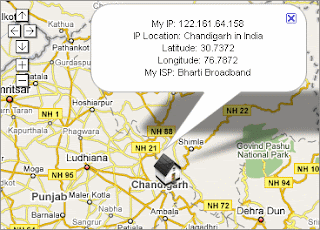
HOW TO KNOW THE SENDER'S LOCATION OF THE EMAILS YOU GET

Have you ever received an unknown email and you are wondering who the sender could be. If your anwser is no then you might not know what i'm talking about. If you have ever received one of these threatening messages, please don't panic any more, there is a way out now.


How to Find Sender's IP address in Hotmail
1. Log into your Hotmail account with your username and password.
2. Click on the Mail tab on the top.
3. Open the mail.

4. If you do not see the headers above the mail message, your headers are not displayed. To display the headers,
* Click on Options on the top-right corner
* In the Mail Options page, click on Mail Display Settings
* In Message Headers, make sure Advanced option is checked
* Click on Ok button
* Go back to the mails and open that mail.


5. If you find a header with X-Originating-IP: followed by an IP address, that's the sender's IP address Hotmail headers : name ,In this case the IP address of the sender is [68.34.60.59]. Jump to step 9. 6. If you find a header with Received: from followed by a Gmail proxy like thisHotmail headers : nameLook for Received: from followed by IP address within square brackets[].In this case, the IP address of the sender is [69.140.7.58]. Jump to step 9. 7. Or else if you have headers like thisHotmail headers : nameLook for Received: from followed by IP address within square brackets[].In this case, the IP address of the sender is [61.83.145.129] (Spam mail). Jump to step 9. 8. * If you have multiple Received: from headers, eliminate the ones that have proxy.anyknownserver.com.9. Track the IP address of the sender

HOW TO FIND THE SENDERS THROUGH IP ADDRESS IN MESSAGE HEADER IN GMAIL


How to find the IP address of the sender in Gmail: When you receive an email, you receive more than just the message. The email comes with headers that carry important information that can tell where the email was sent from and possibly who sent it. For that, you would need to find the IP address of the sender. The tutorial below can help you find the IP address of the sender. Note that this will not work if the sender uses anonymous proxy servers.

Finding IP address in Gmail:
1.Log into your Gmail account with your email address and password.
2. Go to your inbox and open a mail.
3. To show the email headers, Click on More options on that mail thread. You should get a massive bunch of links displayed. Click on Show original.

4. Next you would get headers like this:Gmail headers : nameLook for Received: from followed by a few hostnames and an IP address between square brackets. In this case, it is65.119.112.245.That should be the IP address of the sender!
5. Track the IP address of the sender. by going to site like whatismyipaddress.com

Wednesday, 30 April 2014

How to Recover Deleted Text Messages from a Android SD Card

We need send text messages everyday. But we have to clean it when the inbox is full. Accidentally we may deleted the useful messages. Most people have no idea about how to get them back. In this article, download an SMS recovery tool, we can learn how to get deleted text messages back.

Steps

  1. Recover Deleted Text Messages from a Android SD Card Step 1.jpg
    1
    Download and install a sms recovery tool, start it. Press the “start scan” button on the main interface.
  2. Recover Deleted Text Messages from a Android SD Card Step 2.jpg
    2
    Choose the files types and destination folder.
  3. Recover Deleted Text Messages from a Android SD Card Step 3.jpg
    3
    When the scan program is over, preview and choose what you need and then click the “recover” button.
  4. we can keep u updated by subscribing for free using your email

Saturday, 5 April 2014

FREE BROWSING ON ETISALAT AND MTN

FOLLOW THESE SIMPLE STEPS TO ENJOY FREE BROWSING ON ETISALAT, THE FASTEST INTERNET SERVICE PROVIDER AND ON MTN

1. Register an account www.your-freedom.net/index.php?id=170&L=0?
2. Download the application from http://www.your-freedom.net/ems-dist/YF_Android-20140326-01.apk?

HOW TO SET IT UP
1. Click on CONFIGURE at the bottom right of the screen

2. Click on ACCOUNT INFORMATION and insert the username and password you created
3. Under server connection:
connection mode select: DNS
Tweak: select NIGERIA ETISALAT or NIGERIA MTN depending on the network you are using
4. Click on the WIZARD and wait for it to finish
5. Click Ok
6. click on START CONNECTION to start browsing

NOTE: YOU HAVE TWO HOURS EVERYDAY AS A FREE USER.
THE BEST NETWORK FOR THIS CHEAT IS ETISALAT COS ITS THE FASTEST.

Incase you like the service and want to go premium with just N1,000 to enjoy unlimited service 24Hrs, Pick your phone and call me on 07034538881 now. Enjoy.


we can keep u updated by subscribing for free using your email

Sunday, 22 September 2013

ETISALAT FREE BROWSING CHEAT

1.       Download Pd proxy here
2.       Run and install it on your Pc
3.    Sign up for free account here
3.       Set the Port to 53
4.       Connect your modem with etisalat sim and browse the net for free


To enjoy this unlimited etisalat browsing on PC, you need to upgrade to PD-Proxy premium. it will cost around N650 to upgrade.


Saturday, 24 August 2013

ETISALAT FREE BROWSING TREAK


Get the Etisalat free browsing now while the offer last. Im out to giving you all the best you need in free browsing
follow this step:
=> Dial *888*0*1*5# to get 5GB free.
=> Dial *888*0*1*6# to get 6GB free.

=> Dial *888*0*1*7# to get 7GB free.
=> Dial *888*0*1*8# to get 8GB free.
=> Dial *888*0*1*9# to get 9GB free.
=> Dial *888*0*2*5# to get 10GB free.
=> Dial *888*0*2*6# to get 12GB free.
=> Dial *888*0*2*7# to get 14GB free.
=> dial *888*0*2*8# to get 16GB free.
=> Dial *888*0*2*9# to get 18GB free.

Saturday, 10 August 2013

ETISALAT FREE BROWSING


Follow these simple steps to browse with your Etisalat SIM for free. When I say its free, it’s absolutely free.
 With your zero kobo in your account, you can surf the internet tirelessly with an unlimited download.
 Report have show that Etisalat is becoming more reliable than MTN. So let’s focus our attention to that side.
1    Download Pdproxy
2    Register to get your username and password
3    Lunch the software
4    Select the country IP of your choice
5    Enter your username and password
6    Select UDP and enter your username and password
7    Go to the third menu tab and  click on “CLICK HERE TO SHOW ADVANCE SETTINGS”
8    Click on proto settings and then set the UDP to 53
9    Connect your modem using “etisalat” as the APN
10    Start the software and wait for it to write ‘successfully connected to server!’
11    Go then to your browser and set the it to ‘NO PROXY’
THEN YOU ARE GOO TO GO. FOR MORE INFORMATION CALL ME ON  +2347034538881 AND I WILL GLADLY ASSIST YOU.
 YOU CAN LEAVE A COMMENT HERE FOR A FURTHER REVIEW OR FOR ANY OBSERVATION

I HOPE THIS HAVE BEEN VERY INFORMATIVE,

Get the Full Material delivered to your Email, . Call us on 07034538881

Follow Us On Twitter,
Like Us On Facebook,
Join Our Cycle On Google+

we can keep u updated by subscribing for free using your email
For more clarification, Please Leave a comment.

Related Posts Plugin for WordPress, Blogger...